Do you ever keep writing the same type of content for your WordPress blog posts or pages over and over again? Well here’s a tip, use a reusable block.
Reusable Block
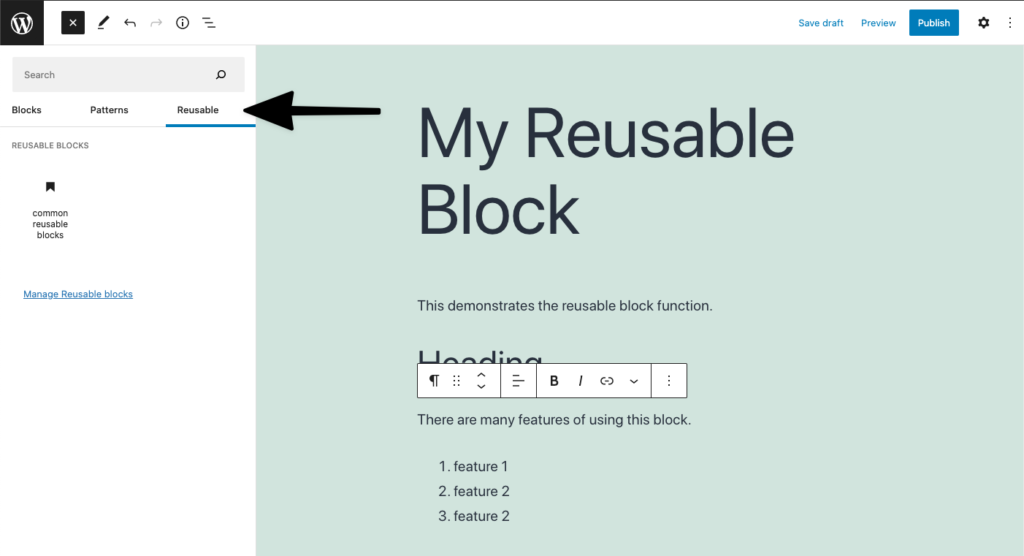
The reusable block in the WordPress block editor, allows you to create, save and reuse the same content or layout on your posts and pages throughout your site. They are easily accessible from the WordPress block editor.
WordPress block editor – library of reusable blocks
Examples
Maybe you have a service page that always follows the same format, you can use a reusable block to design that page and then all you need to do is select the reusable block the next time you add a new service. Other useful ways to use a reusable block:
Create a call-to-action button on all your relevant pages and post.
Create a reusable block for your landing pages – you don’t need a developer to design this for you.
Use it to design the way you want your testimonials to look on every page.
And so much more…
Benefits
There are so many ways that using a reusable block can make it easier for you to create content for your site and be consistent whilst doing it, you can:
Duplicate the content across all your posts and pages.
Save time and stop rewriting or copying and pasting your content from a Word or Google document.
Modify the content in a block and this will modify it everywhere – great for content that needs to stay the same throughout your site. If you don’t want the changes you’ve made on the reusable block to be reflected everywhere else on your site, just convert it to a regular block.
State of the Word was once again delivered by Matt Mullenwerg, co-founder of the WordPress project. Here is my recap.
Key points from 2021 State of the Word
Media assets
People ask me if they need a licence to use photos and other media on their site. Others don’t have the budget to spend on good quality images. Well now I have another option for you to choose from called Openverse and it is open-sourced.
Openverse is an openly licensed media. Search for an image, download and put it on your site. Give attribution to the creator and that’s it.
Openverse, WordPress.org
Openverse was originally Creative Commons before it was taken on by WordPress.org. Over 600 million licensed images are already available and 2 million audio clips will be added soon. Check it out today, visit the Openverse site.
Pattern directory
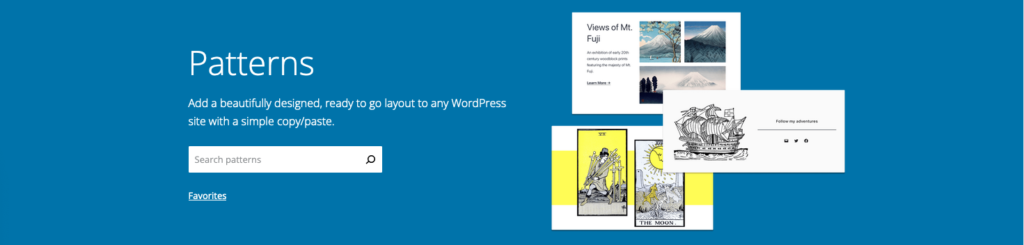
WordPress.org Pattern Directory
Instead of creating a layout for your page or post from scratch, you can select one from the Pattern Directory. This makes it easy to set up your site, you can even copy and paste patterns that you like. I’m excited to see the different patterns that designers will be creating and sharing. Want to learn more about Block Patterns? Check out the following video workshops on Learn WordPress:
We got some stats for the Learn WordPress platform. I often refer clients to Learn WordPress workshops if they want to know how to do something on their own. The Training team is working hard on bringing you more content so keep an eye on updates that come up in the News section of your WordPress Admin Dashboard.
Other areas worth noting
Security – you can rest assured that a lot of investment has gone into updating WordPress. This is ongoing and WordPress.org will continue to work in partnerships with hosting providers and content delivery networks to protect your WordPress sites.
Block widgets in the sidebar – you can now manage the widgets in your sidebar using blocks. This allows you to customise your site even more. Check out using the Block Widget Editor if you want to know more.
Query loop block – I love this block because I can define the parameters I want to use to display my posts without knowing any code. You can use it for any custom post type like your portfolio of work or list of books you’ve published. There is a great article with videos on the query loop block written by the WordPress.org Support team.
WordPress 5.9 and customisation
There are some interesting features coming to 5.9 and a lot of them are to do with customisation. Changing your theme just became much easier, you can customise:
The header and footer
Theme preset visual elements on your site using Styles
Use the Pattern Library to create different layouts for your site all without changing your theme.
Think about all the changes you can make on your own without changing themes or using even more plugins.
Another thing he mentioned that I’m super excited about is being able to drag and drop items in the List view. I love using the List view cause I can see exactly where my block elements (paragraph, heading, quotes) are within a post or page.
WordPress.org List view
Looking forward to the future
You might have noticed that there have been a lot of acquisitions with the WordPress ecosystem. If you’re interested in macroeconomic trends, Matt breaks some of this down for you.
Gutenberg
Matt talked a lot about the evolution of Gutenberg. He reminded us of the 4 phases that he had introduced a few years ago:
Phase 1 – Easier editing, this introduced the Block editor and was completed in 2018.
Phase 2 – Customisation, we are currently in the middle of this phase which started in 2019. WordPress 5.9 will see the MVP (minimal viable product) of this phase.
Phase 3 – Collaboration, this will start in 2023 as more themes, patterns and blocks are added to the directory.
Phase 4 – Multilingual, WordPress is published in multiple languages but there is still a long way to go. Afterall, WordPress is used globally!
Photo directory
Open-source imagery that can be used on any site and will be built into the Media Library. You can also contribute your photos to the Photo Directory.
Final notes
I’m really excited about the customisation of the Block Editor and developments to Learn WordPress coming in 2022. I’ve given you a small snippet of what was covered at State of the Word. If you want to learn more including the updates on translating WordPress into different languages watch the replay below.
Day 2 and it’s about WordPress and the State of the Word. Before I get into that though, have you filled out the annual WordPress survey? The great thing about WordPress being open-source is that you get to have a say. No matter how you use WordPress, your views are still relevant. It should take you no more than 10 minutes to complete.
State of the Word
It is that time of the year when Matt Mullenwerg, co-founder of the WordPress project, delivers the annual keynote speech. We get to hear about the progress to date and future plans. This year will be an in-person event in New York and will be live-streamed on YouTube. It will a late night for us UK folks, it doesn’t start until 10 pm.
The topics
Matt tries to cover a range of topics but the key things I’m interested in are the release of WordPress 5.9 and his vision for Learn WordPress.
WordPress 5.9
January 2022 will see the release of WordPress 5.9. This major release will allow you to easily build and customise themes to a greater extent without the need for a developer or designer. These are some of the things you can expect:
Edit part of your sites including the header and footer
Drag and drop elements in the Block Editor List view (this is one I’m excited about)
Even more design patterns
Have a look at this sneak preview of what you will be able to do.
Learn WordPress
This month, the Make Training team has been defining its goals for 2022, part of that includes the further development of the Learn WordPress platform.
Learn WordPress is a learning resource for anyone who wants to learn how to use, build for and contribute to WordPress. It is an open-source platform built by the community that offers a range of materials and opportunities for you to use at your own pace and time.
I’m excited to hear about Matt’s vision for the coming year and how we as a Training team, can ensure that it aligns with the plans for 2022.
When and where?
When: State of the Word will take place today December 14, 2021, at 10 pm UK time until midnight.
Don’t want to watch it all on your lonesome? Join a local watch party and get that feeling of being at a WordCamp or Meetup. I am going to be watching it online and will then join one of the post-roundups.
I just wrapped up a workshop at WCEU 2021, the topic was on Learn WordPress. By contributing to Learn WordPress, you can help give those new or already using WordPress a roadmap for their learning journey. This could be through gaining a better understanding of the difference between a post and a page, improving your code skills, or progressing and sharing your skills as a longer-term contributor.
Learn WordPress connects multiple WordPress Make teams, business owners, professionals, and individual users with ways to navigate their journey through WordPress the software and WordPress, the open-source project.
WordPress.org is made up of many different teams. These work together on Learn WordPress, the resource launched at the end of 2020. We are currently working on a proposed roadmap for content that will aim to include the learning needs of a wide range of audiences, from website visitors, designers, and developers, supporting those with accessibility needs. This will help guide future content on Learn.WordPress.org. Roadmaps to learning are similar to a syllabus of the curriculum but presented in a visually organized manner, like a flowchart.
Planning the content will help others take the next step in learning about the WordPress platform and its community. Learn WordPress contributors come from a variety of backgrounds. We are content creators, project managers, technical writers, designers, developers, trainers, and teachers. We would like to work with you, come join us.