Tag: WordPress

  • 2021, Year In Review

    2021, my first public year in review, was bittersweet.

    What did I celebrate?

    I became even more active in the WordPress community and one of the Make Training Team Representatives. I’m so excited about some of the plans that we have for making WordPress training more accessible.

    I met so many people. Now I know that is weird considering we were still in lockdown (at least here in the UK) for a lot of it but I met so many people online and from all over the world.

    I became an organiser for WordFest Live January and WordFest Live July. WordFest Live is a global 24-hour virtual celebration of everything WordPress. It is free to attend and if you want to learn more about how to use WordPress or just network then this is the place to be.

    Shortly after that, I became a Board Member for Big Orange Heart Foundation. I’m a remote worker and having an organisation in the WordPress community that is dedicated to supporting my well-being and mental health all for free is truly a blessing.

    I was a speaker at WCEU and WCUS, 2 of the biggest WordCamps in the world.

    I was also featured on a few other podcasts, Unplug Tech and WP Watercooler. I also have an ongoing segment on the WP Minute which delivers weekly WordPress news in under 5 minutes. I do it monthly and talk about all the things we are doing in the Make WordPress.org Training team and Learn WordPress, my segment is called the Learn WP Minute.

    I was featured on guest articles and posts including an award for the Yoast Care Fund and a feature post on HeroPress.

    I launched 2 new WordPress services:

    • Drop-in clinic for quick fixes on your site.
    • Power Hour for when you need that dedicated one-to-one guidance.

    It wasn’t all rosy though.

    What were the challenges?

    Despite all the wins, this year has also been my most challenging ever.

    I am actually surprised at what I managed to achieve especially when 5 people very dear to me passed away this year. I view grief very differently now and I think that goes for anyone who experiences it for the first time. We all know someone who has died but when it someone very close to you, it changes your perspective. I wasn’t prepared for that, no one is.

    Time! We all say that but I really struggled to manage my time this year and all because of everything that had happened. It meant a lot of things had to be put on the back burner.

    Planning with so much uncertainty in the world. Especially given that we were all still dealing with the impact of restrictions as a result of the coronavirus (COVID-19) pandemic.

    What have I learnt?

    Have a plan in place for when you are gone. This is something that we don’t think about and certainly don’t talk about it. However, if you are a small business owner what plans have you put in place for when you’re gone? Does your family know your wishes? Write it all down, you don’t want your family or staff to be picking up the pieces when you are no more.

    Not to be responsible for other people’s decisions. I can give them the information they need to make an informed decision but ultimately the decision is theirs, not mine!

    Sometimes your plans get derailed and you have to pivot. It is ok to pivot and it is ok to let go!

    Conclusion

    In the midst of trials, I can survive and come out stronger!

  • 12 Days of Blogmas 2021, Day 8 – WordPress: Reusable Block

    12 Days of Blogmas 2021, Day 8 – WordPress: Reusable Block

    Do you ever keep writing the same type of content for your WordPress blog posts or pages over and over again? Well here’s a tip, use a reusable block.

    Reusable Block

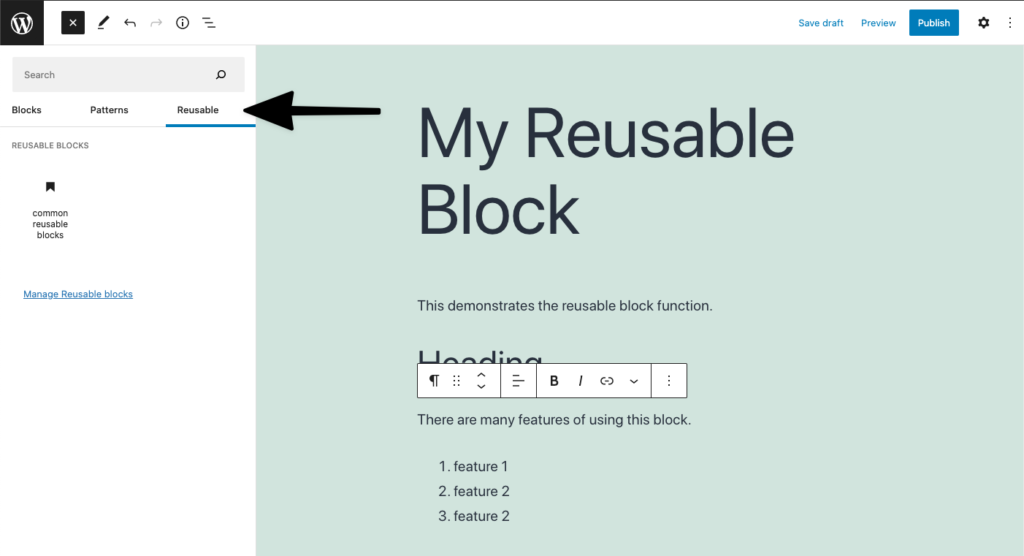
    The reusable block in the WordPress block editor, allows you to create, save and reuse the same content or layout on your posts and pages throughout your site. They are easily accessible from the WordPress block editor.

    WordPress block editor with the reusable block tab highlighted
    WordPress block editor – library of reusable blocks

    Examples

    Maybe you have a service page that always follows the same format, you can use a reusable block to design that page and then all you need to do is select the reusable block the next time you add a new service. Other useful ways to use a reusable block:

    • Create a call-to-action button on all your relevant pages and post.
    • Create a reusable block for your landing pages – you don’t need a developer to design this for you.
    • Use it to design the way you want your testimonials to look on every page.
    • And so much more…

    Benefits

    There are so many ways that using a reusable block can make it easier for you to create content for your site and be consistent whilst doing it, you can:

    • Duplicate the content across all your posts and pages.
    • Save time and stop rewriting or copying and pasting your content from a Word or Google document.
    • Modify the content in a block and this will modify it everywhere – great for content that needs to stay the same throughout your site. If you don’t want the changes you’ve made on the reusable block to be reflected everywhere else on your site, just convert it to a regular block.

    If you want to start creating your own reusable blocks, take a look at how to easily create and use a reusable block on Learn WordPress.

    I love using reusable blocks and I hope that you will too.

  • 12 Days of Blogmas 2021, Day 3 – WordPress: State of the Word Recap 2021

    12 Days of Blogmas 2021, Day 3 – WordPress: State of the Word Recap 2021

    Slight change to the published Blogmas schedule.

    State of the Word was once again delivered by Matt Mullenwerg, co-founder of the WordPress project. Here is my recap.

    Key points from 2021 State of the Word

    Media assets

    People ask me if they need a licence to use photos and other media on their site. Others don’t have the budget to spend on good quality images. Well now I have another option for you to choose from called Openverse and it is open-sourced.

    Openverse is an openly licensed media. Search for an image, download and put it on your site. Give attribution to the creator and that’s it.

    Openverse, WordPress.org

    Openverse was originally Creative Commons before it was taken on by WordPress.org. Over 600 million licensed images are already available and 2 million audio clips will be added soon. Check it out today, visit the Openverse site.

    Pattern directory

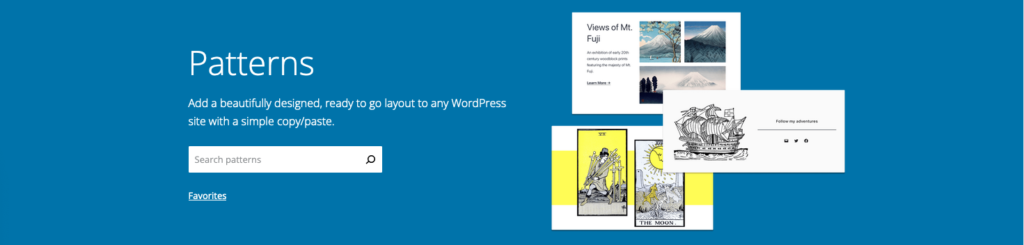
    WordPress.org pattern directory. To the right it displays the heading "Patterns", text "add a beautifully designed, ready to go layout to any WordPress site with a simple copy/paste", and a search button with a link to "Favourites".  To the left, are an overlay of 3 different types of patterns you can use to display your content.
    WordPress.org Pattern Directory

    Instead of creating a layout for your page or post from scratch, you can select one from the Pattern Directory. This makes it easy to set up your site, you can even copy and paste patterns that you like. I’m excited to see the different patterns that designers will be creating and sharing. Want to learn more about Block Patterns? Check out the following video workshops on Learn WordPress:

    Learn WordPress

    Learn WordPress.org header displaying the text "Whether you’re a first-time blogger or seasoned developer, there’s always more to learn. From community members all over the world, these vast resources will help you learn more about WordPress and share it with others. " and a search button
    Learn WordPress.org

    We got some stats for the Learn WordPress platform. I often refer clients to Learn WordPress workshops if they want to know how to do something on their own. The Training team is working hard on bringing you more content so keep an eye on updates that come up in the News section of your WordPress Admin Dashboard.

    Other areas worth noting

    1. Security – you can rest assured that a lot of investment has gone into updating WordPress. This is ongoing and WordPress.org will continue to work in partnerships with hosting providers and content delivery networks to protect your WordPress sites.
    2. Block widgets in the sidebar – you can now manage the widgets in your sidebar using blocks. This allows you to customise your site even more. Check out using the Block Widget Editor if you want to know more.
    3. Query loop block – I love this block because I can define the parameters I want to use to display my posts without knowing any code. You can use it for any custom post type like your portfolio of work or list of books you’ve published. There is a great article with videos on the query loop block written by the WordPress.org Support team.

    WordPress 5.9 and customisation

    There are some interesting features coming to 5.9 and a lot of them are to do with customisation. Changing your theme just became much easier, you can customise:

    • The header and footer
    • Theme preset visual elements on your site using Styles
    • Use the Pattern Library to create different layouts for your site all without changing your theme.

    Think about all the changes you can make on your own without changing themes or using even more plugins.

    Another thing he mentioned that I’m super excited about is being able to drag and drop items in the List view. I love using the List view cause I can see exactly where my block elements (paragraph, heading, quotes) are within a post or page.

    WordPress.org List view

    Looking forward to the future

    You might have noticed that there have been a lot of acquisitions with the WordPress ecosystem. If you’re interested in macroeconomic trends, Matt breaks some of this down for you.

    Gutenberg

    Matt talked a lot about the evolution of Gutenberg. He reminded us of the 4 phases that he had introduced a few years ago:

    1. Phase 1 – Easier editing, this introduced the Block editor and was completed in 2018.
    2. Phase 2 – Customisation, we are currently in the middle of this phase which started in 2019. WordPress 5.9 will see the MVP (minimal viable product) of this phase.
    3. Phase 3 – Collaboration, this will start in 2023 as more themes, patterns and blocks are added to the directory.
    4. Phase 4 – Multilingual, WordPress is published in multiple languages but there is still a long way to go. Afterall, WordPress is used globally!

    Photo directory

    Open-source imagery that can be used on any site and will be built into the Media Library. You can also contribute your photos to the Photo Directory.

    Final notes

    I’m really excited about the customisation of the Block Editor and developments to Learn WordPress coming in 2022. I’ve given you a small snippet of what was covered at State of the Word. If you want to learn more including the updates on translating WordPress into different languages watch the replay below.

    State of the Word 2021

  • 12 Days of Blogmas 2021, Day 2 – WordPress: State of the Word 2021

    12 Days of Blogmas 2021, Day 2 – WordPress: State of the Word 2021

    Day 2 and it’s about WordPress and the State of the Word. Before I get into that though, have you filled out the annual WordPress survey? The great thing about WordPress being open-source is that you get to have a say. No matter how you use WordPress, your views are still relevant. It should take you no more than 10 minutes to complete.

    State of the Word

    It is that time of the year when Matt Mullenwerg, co-founder of the WordPress project, delivers the annual keynote speech. We get to hear about the progress to date and future plans. This year will be an in-person event in New York and will be live-streamed on YouTube. It will a late night for us UK folks, it doesn’t start until 10 pm.

    The topics

    Matt tries to cover a range of topics but the key things I’m interested in are the release of WordPress 5.9 and his vision for Learn WordPress.

    WordPress 5.9

    January 2022 will see the release of WordPress 5.9. This major release will allow you to easily build and customise themes to a greater extent without the need for a developer or designer. These are some of the things you can expect:

    • Edit part of your sites including the header and footer
    • Drag and drop elements in the Block Editor List view (this is one I’m excited about)
    • Even more design patterns

    Have a look at this sneak preview of what you will be able to do.

    Learn WordPress

    This month, the Make Training team has been defining its goals for 2022, part of that includes the further development of the Learn WordPress platform.

    Learn WordPress is a learning resource for anyone who wants to learn how to use, build for and contribute to WordPress.  It is an open-source platform built by the community that offers a range of materials and opportunities for you to use at your own pace and time.

    I’m excited to hear about Matt’s vision for the coming year and how we as a Training team, can ensure that it aligns with the plans for 2022.

    When and where?

    When: State of the Word will take place today December 14, 2021, at 10 pm UK time until midnight.

    Where: Livestreamed from New York City

    Watch party

    Don’t want to watch it all on your lonesome? Join a local watch party and get that feeling of being at a WordCamp or Meetup. I am going to be watching it online and will then join one of the post-roundups.

  • My HeroPress Essay: Finding my Global Family

    In May 2021, I got a DM from Topher DeRosia, the curator of the HeroPress

    Hello there! Could I convince you to do a HeroPress essay?

    Topher DeRosia, HeroPress

    I met Topher through his wife Cate. Cate and I volunteer with Big Orange Heart. She is the expansion lead for the HeroPress Network, cohost of Hallway Chats, Marketing Lead for Big Orange Heart’s WordFest Live, and an amazing person.

    What is HeroPress?

    HeroPress tells the stories of people who have leveraged WordPress and its community to change their lives and achieve their goals. Through these stories, global connections are made and conversations had that build a stronger community, more employment and educational opportunities, and easier access to resources.

    HeroPress

    My WordPress story

    At the time I had received Topher’s DM, I was in no shape to be writing anything legible. I said yes though and as time went on, I just couldn’t think of what to write about.

    Thank God for Topher’s patience! He gave me a topic to focus on and I was able to write the essay, 5 months after the initial request (sorry).

    Finding my global family (samun iyali na duniya) is now available on the HeroPress website in both English and Hausa. I am from Kaduna, Nigeria and when I saw the essays on HeroPress had been translated into different languages, I just had to make sure I represented my people.

    I hope you enjoy my story about how I got into WordPress, the life it gives me and why I stay.

  • I am a Yoast Care Fund Recipient

    I am a Yoast Care Fund Recipient

    Congratulations!!!!!

    With a headline like that, I scanned the email to check it wasn’t spam and then subsequently filed it under newsletters. I would get to it when I had time.

    Later that day, I was chatting with my fellow Make Training team rep, Courtney Robertson. During the conversation, it became very apparent that there was something in my inbox I should be paying attention to. So I had a look and scanned the email, this bit is important and I will explain why later.

    Courtney had nominated me to receive the Yoast Care fund.

    What is the Yoast Care fund?

    The Yoast Care fund aims to put people who have made significant contributions to WordPress in the spotlight. One can be nominated for their work on WordPress or contribution to the fund, which rewards people who have contributed (and therefore mean a lot) to WordPress.

    Yoast

    Reality sinks in

    I thanked Courtney for nominating me and then proceeded to review the questionnaire that was attached to the email. I told her which questions I was going to answer and then began to fill it out. The questionnaire is used to form the basis of an interview which is then posted on the Yoast Care fund blog.

    Remember when I said I only scanned the email. Well attached to it was a payment form and it was in completing this that it struck me – I wasn’t just being nominated, I had already been awarded the fund. I contacted Courtney to thank her once again. Of course, she laughed at the fact that it was only just sinking in.

    I submitted my forms and a few weeks later received my award of $500. My interview with the Yoast Care team can be found on their blog. I’m not entirely sure where I want to allocate the funds, but I will let you know what I decide.

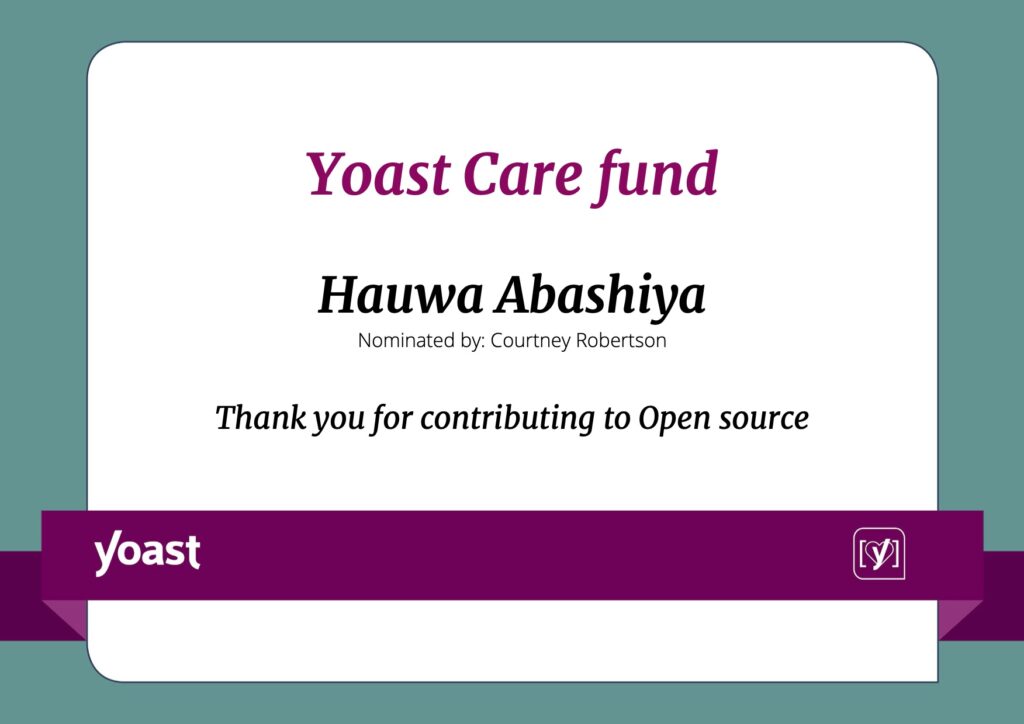
    Yoast Care fund certificate
    My Yoast Care fund certificate, nominated by Courtney Robertson

    Thank you

    First of all, I want to say thank you to Courtney Robertson for nominating me. She is such a wonderful, caring, and knowledgeable person and the WordPress community is lucky to have her.

    Yoast, thank you for all that you do for the community and for making it possible for individuals like me to receive this fund.

    To the WordPress community who contribute to the WordPress project, thank you for welcoming me and for all the time and effort that you put into making WordPress. With 19 teams (at the time I’m writing this) there is no shortage of help needed. I contribute to at least 3 teams (Training, Accessibility and Marketing) so come join us if you want to help shape WordPress.